
Cheat sheet
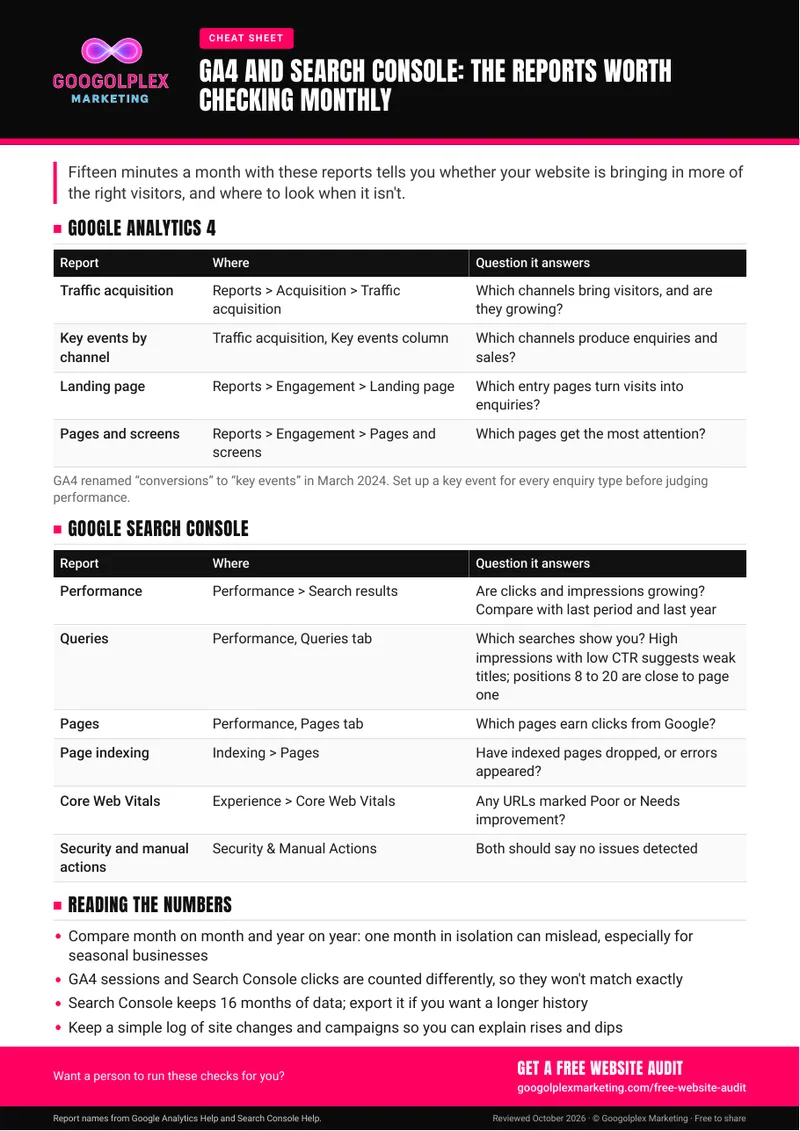
Spend about a quarter of an hour each month with the right reports and you'll know whether your website is attracting more of the visitors you want. This cheat sheet lists ten reports across GA4 and Search Console, with where to find them and what to look for.
Reviewed
October 2026
Business owners and marketers who have GA4 and Search Console set up but aren't sure which reports deserve their attention, and anyone preparing a simple monthly update for colleagues.
Pick a fixed day each month and run through the reports in order. Before judging results, make sure every enquiry type is set up as a key event in GA4, the term GA4 now uses for conversions. Look out for queries with high impressions but a low click-through rate, which point to weak titles, and for queries in positions 8 to 20, which are within reach of page one. Note down site updates and campaign launches as they happen, so you can match changes in the numbers to what you did.
Free audit
Numbers raising questions? Request a free website audit.
Get a free website auditRather we handled it for you? See Organic search management
Guide updates
Hear about new guides by email
Signing up is optional: leave your email and we'll let you know when we publish a new guide or meaningfully update an existing one.
Thanks, you're signed up. We'll email you when there's a new or updated guide.
Sorry, that didn't work. Please check your email address and try again.