Checklist

Google Business Profile Optimisation Checklist

Your Google Business Profile is what local customers see when they find you in Google Maps and local results. This checklist covers the settings, content and routines that keep it accurate, complete and within Google's guidelines.

Reviewed

October 2026
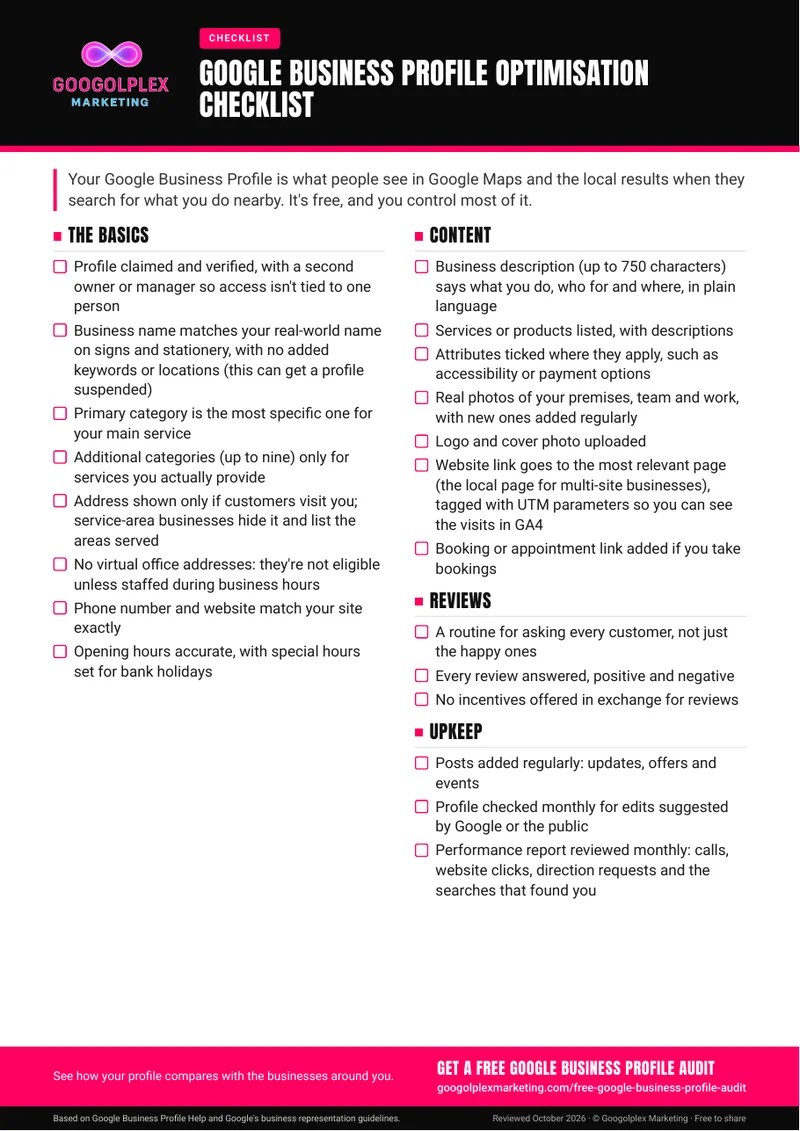
One-page PDF. Free to download and share.

Google Business Profile Optimisation Checklist

Google Business Profile optimisation checklist

The PDF groups everything into four areas you can tick off in one sitting:

  • The basics: verification and a second owner or manager, your real-world business name, the right primary and additional categories, address or service-area settings, matching contact details and accurate opening hours, including bank holidays.
  • Content: a plain-language description of up to 750 characters, services or products, attributes, real photos, a logo and cover photo, a tagged website link and a booking link if you take appointments.
  • Reviews: a habit of asking all your customers, replying to every review and never offering incentives.
  • Upkeep: regular posts, a monthly check for suggested edits and a monthly look at the performance report.

Why your profile matters

People can see your profile without ever visiting your website. It's where they check your hours, read reviews, ask for directions or call you directly. It costs nothing, and most of what appears on it is under your control, which makes it one of the most practical places for a local business to start.

The mistakes we see most often

  • Keywords or locations added to the business name: if the name doesn't match your signs and stationery, the profile can be suspended.
  • Vague categories: a broad primary category when a more specific one describes your main service, or additional categories for services you don't offer.
  • Address problems: showing an address customers can't visit, or using a virtual office, which isn't eligible unless it's staffed during business hours.
  • Access tied to one person: a single owner login that leaves the business locked out when someone moves on.
  • Stale profiles: no new photos or posts for months, holiday hours never set and suggested edits left unchecked.
  • Selective review requests: asking only happy customers, or leaving negative reviews without a reply.

What to do first

Begin with the items that affect eligibility and accuracy, then move on to content:

  • Confirm the profile is verified and add a second owner or manager.
  • Check the business name, address or service areas, phone number and website against your own site and signage.
  • Choose the most specific primary category for your main service, then review the additional ones (you can have up to nine).
  • Set special hours for upcoming bank holidays.
  • Point the website link at the most relevant page and add UTM parameters so GA4 can show you the visits.

With the basics right, add real photos, list your services and set up a review routine you can keep going.

Keeping it up to date

A profile isn't a one-off job. Once a month, look for edits that Google or members of the public have suggested, and review the performance report: calls, clicks to your website, requests for directions and the search terms people used. Add posts on a steady rhythm and new photos as you complete work. Our 12 Months of Google Business Profile Post Ideas and Review Request and Reply Swipe File cover posting and reviews in more detail.

When to bring in a specialist

Get help if your profile has been suspended, if you can't regain access to a profile someone else set up, if you manage several locations, or if a competitor appears to be breaking the guidelines and you want to report it properly. A specialist is also useful when your profile is complete but you're still not appearing for the searches that matter, which can point to factors beyond the profile, such as your website and your listings on other sites.

Free audit

Profile need a second look? Get a free Google Business Profile audit.

Get a free Google Business Profile audit

Rather we handled it for you? See Local SEO services

Guide updates

Hear about new guides by email

Signing up is optional: leave your email and we'll let you know when we publish a new guide or meaningfully update an existing one.

Read how we use your details in our privacy policy.

Thanks, you're signed up. We'll email you when there's a new or updated guide.

Sorry, that didn't work. Please check your email address and try again.