
Swipe file
Stop paying for searches that were never going to become customers. These starter lists group common negative keywords by theme, from job seekers to DIY researchers, with notes on match types and the words that can backfire.
Reviewed
October 2026
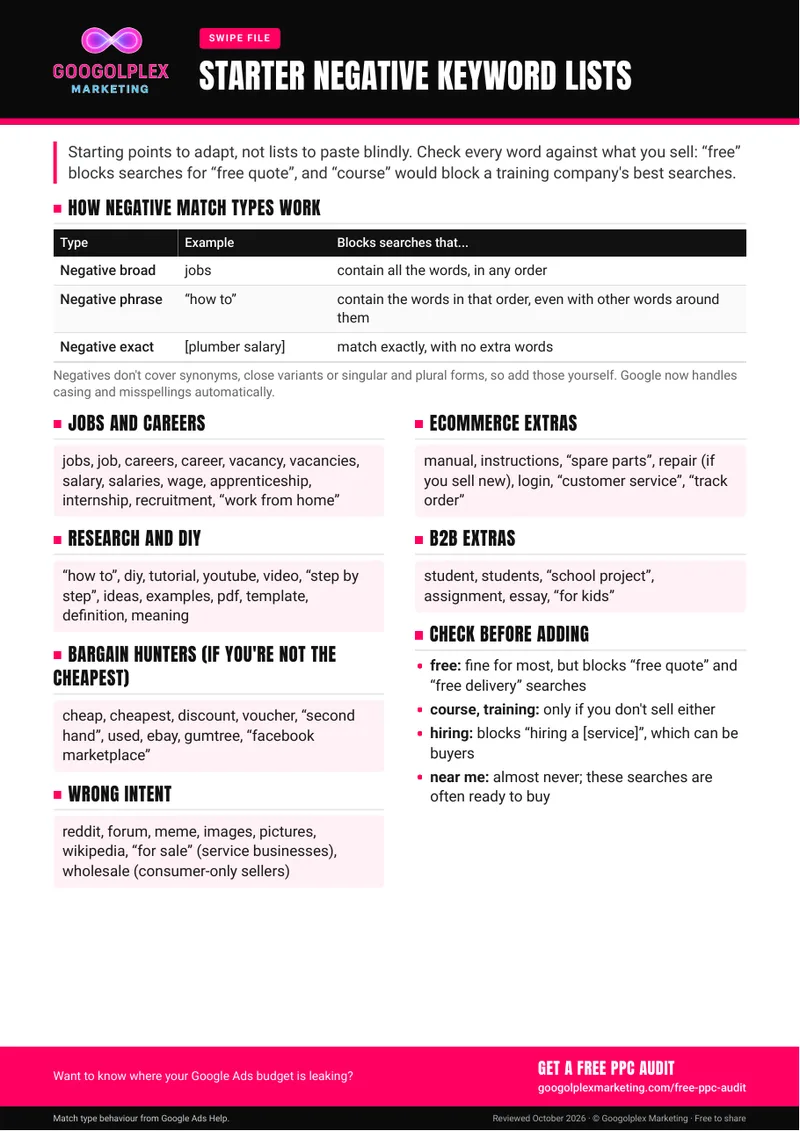
Negative keywords tell Google Ads which searches you don't want your ads to appear for. This PDF gives you themed starting lists to adapt:
Negative keywords behave differently from the keywords you bid on, and the PDF explains each type with an example:
The catch: negatives won't pick up plurals, synonyms or near variations, so list those separately. Capital letters and misspellings are now handled automatically.
Every click on a search that was never going to convert still costs you. Broad match can show your ads for a wide range of related searches, so a well-kept negative list helps keep your spend on people who might buy. Shared negative lists save time too: you build them once and apply them across campaigns.
Open your search terms report for the last few months and look for searches that could never lead to a sale. Compare them with the starter lists, then build your own shared lists, checking each word against your own products and services before you add it. Choose the match type deliberately: use phrase or exact negatives when a single word on its own could block good searches. Then make reviewing search terms part of a regular routine.
If your account has many campaigns, a large product range or years of accumulated negatives, conflicts become harder to spot: a negative in one list can quietly block keywords you're bidding on elsewhere. A PPC specialist can review existing lists, check for negatives that clash with active keywords and set up a review routine that suits the size of your account.
Free audit
Paying for the wrong searches? Request a free PPC audit.
Get a free PPC auditRather we handled it for you? See Paid media management
Guide updates
Hear about new guides by email
Signing up is optional: leave your email and we'll let you know when we publish a new guide or meaningfully update an existing one.
Thanks, you're signed up. We'll email you when there's a new or updated guide.
Sorry, that didn't work. Please check your email address and try again.